
In today’s digital world, many homeowners are changing the traditional deadbolt locks to smart locks for seamless entry, enhanced security, and remote access. However, one vital concern many people overlook is what happens when the power goes out. Smart lock power outage issues can leave you puzzled and frustrated—not just at the moment but in planning for long-term reliability. At rekey xpress, we understand how crucial uninterrupted access is in every home and how frustrating it can be when your smart lock not working during power outage moments.
Do You Know?
According to the research by Coherent Market Insights, the global market of smart door lock was estimated to be valued at USD 3.16 Bn in 2025 and now it is projected to reach USD 10.43 Bn by 2032, at a compound annual growth rate (CAGR) of 18.6% from 2025 to 2032.
Let’s unpack why smart locks sometimes fail during power outages and what you can do to keep your home both smart and secure.
Key Takeaways
- Some of the reasons why smart lock power outage issues arise are the limited life of batteries, network dropout, or absence of backup systems.
- Doing routine inspections and using high capacity batteries will definitely lower the risk of power failure.
- If you put a UPS for network devices, it will be able to keep the connection running during power outages.
- Getting a professional to install and maintain your smart lock will help to avoid many of the failures that the smart lock can have.
- It is always good to have a backup plan in case of an emergency mechanical keys, portable power, or locksmith support.
What Happens to Smart Locks in a Power Outage?
Smart locks rely heavily on power for their operations that power can come from your home’s electrical system, batteries inside the lock itself, or a connected smart home hub. When there is an unexpected power outage, these devices may lose communication with your central system, become unresponsive, or fail to unlock—even with correct codes.
Experiencing a smart lock power failure doesn’t necessarily imply that your locking device is faulty in fact, most of the times it indicates the lack of a proper power supply plan.
Top Causes of Smart Lock Not Working During Power Outage
Here are the most common reasons why these high tech gadgets fail to operate during power outages:
1. Inadequate Backup Power:
Smart locks use local batteries or depend on a Wi Fi hub which often doesn’t have a battery backup. In case when the main power supply is shut down and batteries are drained, the lock might fail to respond or will not process command easily.
2. Network Disconnection:
The lock hardware might still have power, however, without a Wi Fi or internet connection a remote lock/unlock operation would fail. The message you send via your app first needs to go through your home network hence that’s why it won’t work.
3. Poor Installation or Configuration:
Incorrect setup can amplify outage problems. If the smart lock hasn’t been set up with redundancy or if it hasn’t been properly connected to backup power, you will feel the impact more intensely during failures.
4. Component Failure:
Even in well-designed systems, components like battery terminals, sensors, or wiring can wear out particularly if they are not maintained regularly.
Related Blog:-
How a Commercial Locksmith Installs and Manages Smart Door Locks
Prevention Tips to Avoid Smart Lock Power Failures
It’s totally possible to secure your home and be safe at home. Take a look at these time tested and effective strategies to reduce downtime and ensure your smart lock continues working even during power outages.
1. Install a Strong Battery Backup:
Check what kind of battery type your lock has and replace it with long-life, high-capacity batteries. There are certain smart locks that can be powered by an external battery — choose them.
Pro Tip: Always keep fresh batteries for backup and replace them proactively, don’t wait until they run out.
2. Use an Uninterruptible Power Supply:
Connecting your smart home hub or Wi Fi router to a UPS keep communication running even when grid power is shut down. This reduces the chance of your smart lock to fail while responding because of loss of connectivity.
3. Regular Maintenance & Health Checks:
Smart locks should be treated like any other security device. Have a regular check for firmware updates, battery health notifications, and error alerts. Performing routine maintenance on schedule is a great way to spot the problems, which if untouched might cause your smart lock not to work during power outage events.
4.Professional Installation Matters:
Working with a skilled smart lock installer will ensure correct placement, power redundancy support, and proper configuration. Cutting corners at the time of installation leads to avoidable problems down the road.
How to Respond When Your Smart Lock Fails in a Power Outage
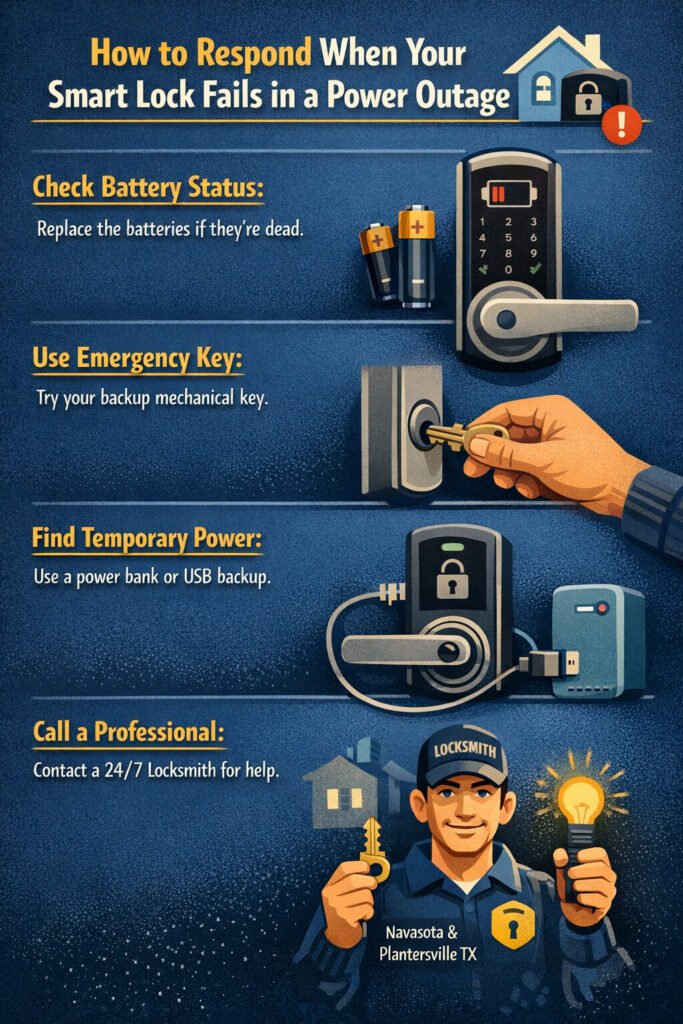
Even with the best planning, outages happen. Here’s what to do when you face a smart lock failure:
- Check Battery Status:
Initially try to change the internal batteries when the battery runs out. Most of the locks shows a low power warning before running out of power, but an unexpected blackout can cause a battery to run out very fast.
- Use Emergency Mechanical Key:
There are a few smart locks that can be opened with a normal key feature, which is made for emergency situations. Make sure to store the key in a location where it is easy to get to and try using it often particularly when the unlocking method you prefer is always digital.
- Look for Temporary Power:
A portable power bank or UPS can help restore minimal functionality. There are several smart locks that allow you to connect an external power through USB in emergencies.
- Contact a Professional:
In case you remain locked out or can’t power your system back up, get in touch with a nearby professional. If it’s an emergency help from a locksmith or routine assistance from a Home locksmith Plantersville TX, skilled technicians will ensure a safe entry to your home.
How Smart Lock Installers and Locksmiths Can Help
If you encounter persistent smart lock power failure cases, calling a professional not only resolves issues but also installs intelligent safeguards from the start.
- Home locksmith Plantersville professionals take a thorough look at your home’s locks and ensure all the safety measures are setup correctly.
- 24 hour locksmith Navasota TX services help handle emergency lock troubleshooting—even in off-peak hours when power and connectivity issues cause problems.
- Locksmith Montgomery TX experts can assist with retrofitting traditional locks with advanced smart features.
The smart lock features depend on both the model and the brand however, local professionals know how to get the best of these systems so that they even operate well under the rare circumstances.
Take Control of Smart Lock Reliability During Outages
Power outages are unpredictable — yet with some planning and the right setup, you don’t have to be locked out of your own home when they happen. From installing backup power to scheduling regular maintenance, there are practical steps every homeowner can take to keep their smart lock working reliably. If you are still unsure where to start from or want expert installation and support, then rekey xpress is the trusted partner for smart, secure, and outage-resilient locking solutions.
Also Read This Blog:-
Smart Lock Installation Guide: How Keyless Entry Door Systems Enhance Home Security
Frequently Asked Questions
Ques1. What if my smart lock stops working in a power outage, what should I do?
Ans: Firstly, check the internal batteries. If it still doesn’t work, rely on the mechanical override key or a portable battery. Don’t hesitate to call in a professional locksmith if you are having trouble.
Ques2. What steps should I take to avoid power failure of my smart lock?
Ans: Use premium backup batteries, connect your router and smart hub to a UPS, and keep a regular maintenance schedule.
Ques3. Do smart locks have the ability to function without Wi Fi during an outage?
Ans: Some smart locks have a local Bluetooth or keypad you could use if Wi Fi is down, however, they cannot be controlled remotely until Wi Fi is back.
Ques4. Would I be wasting my money if I hire a professional smart lock installer?
Ans: Not at all! An expert installation guarantees power backup, proper configuration, and can help in avoiding future issues such as smart lock power outages.
Ques5. How long do most smart lock batteries last on average?
Ans: There is a big range of battery lives, but many of them can last 6 12 months with normal use. Heavy use or weak batteries can drastically shorten this.